
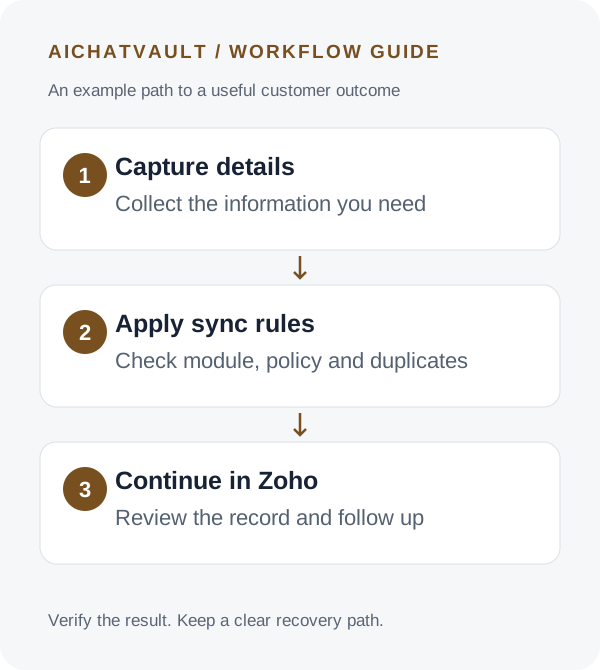
A promising conversation is easy to lose when its details stay in a chat transcript. Someone asks about your service, leaves an email address and explains their requirements, but the sales team never receives a usable record.
Connecting AIChatVault to Zoho CRM gives that conversation a place in your sales process. The useful outcome is a correctly mapped lead or contact with enough context and clear ownership for the next person to act.
Define success before connecting: one intended CRM record, accurate contact details, an understandable customer request and a clear follow-up owner.
Choose Leads or Contacts deliberately
Use the module that matches your existing Zoho process. If new enquiries normally enter Leads for review, preserve that convention. If your team uses Contacts for an established relationship, configure the integration accordingly.
Do not treat every captured email address as a qualified opportunity. Qualification depends on your criteria: service fit, location, buying timeframe or another meaningful signal. Capture those signals where your supported fields and workflow allow, and have the team review them before making sales commitments.
Connect the correct Zoho organisation
- Prepare an AIChatVault agent with lead capture configured for the contact details you need.
- Open Integrations → Zoho CRM for that agent.
- Choose Connect with Zoho CRM and approve access using a Zoho user with the required permissions.
- Confirm the connected organisation when you return to AIChatVault.
- Run Test Connection, then choose the destination module and save the sync settings.
Connection success verifies access; it does not prove that every record satisfies your CRM’s required fields. Review module requirements and the supported field mapping before the first real sync.
Set when captured details should sync
The automatic captured-lead sync offers three policies. All sends captured leads automatically. Consent requires the separate CRM-specific consent field. Handoff waits for the conversation to reach human handoff.
Choose the policy that matches your customer experience. If you use Consent, test both an accepted and an unaccepted consent value. A customer agreeing to receive a support reply is not automatically the same as the CRM-specific consent field being satisfied.
AIChatVault also exposes separate live CRM tools during conversations. Those are a distinct execution path from the automatic captured-lead sync. Validate their behavior separately before relying on a sync policy or dry-run setting as a control over every possible CRM write.
Decide what happens when the person already exists
Configure duplicate handling before broad rollout. A returning prospect should not produce confusing parallel records, and a short new conversation should not unexpectedly replace valuable existing information.
Use a controlled example with an email already in Zoho. Submit the same details again, then inspect the actual result. Check which fields changed, which record was used and whether optional tasks or notes were added again. Repeat with a new email so you can compare the two paths.
Make customer corrections part of this test. If a visitor corrects an email address halfway through a conversation, the team needs the final intended value, not an assumption based on the first message.
Add context and ownership that help your team
Enable a conversation note when it gives the next person useful background. AI summary notes can keep the record concise; inspect summaries for missing requirements or overstated buying intent. Include only the information your team needs.
Choose fixed ownership, round-robin assignment or your existing unassigned queue as appropriate. Optional follow-up tasks can make the next step visible, but they need a realistic due period and someone responsible for completing them.
Keep deal creation separate from basic lead capture. Where supported, optional deal settings can help an established process. A casual pricing question should not be represented as a won sale.
Walk through a controlled example
The following example uses fictional details:
Visitor: “We need support automation for two websites. Could someone discuss the setup?”
Agent: “Which email address should the team use to follow up?”
Visitor: “alex@example.com. We are considering a launch next month.”
For automatic sync configured to Leads, inspect the resulting record for the intended email and available mapped details. If notes and a task are enabled, confirm that the note describes the two-site requirement and tentative timeframe without inventing budget, authority or commitment.
Sandbox mode is useful for testing the documented automatic sync path: writes are simulated and logged as dry runs. After reviewing those results, use an explicitly identified test record to verify the actual Zoho outcome. Do not assume a simulated success guarantees a real record will pass Zoho validation.
Troubleshoot by following the record
- No sync: inspect whether capture completed and the selected sync policy was satisfied.
- Rejected record: review required fields, mapping and the connected user’s module permissions.
- Unexpected owner: check assignment settings and integration activity.
- Repeated records or tasks: test duplicate behavior and the triggers producing follow-up activity.
- Access failure: run Test Connection and reconnect if Zoho access has been revoked.
Track usable records rather than raw volume: valid contact details, duplicate rate, correct ownership and whether follow-up happened. These checks reveal whether the integration is improving the sales process.
Common questions
Does connecting Zoho CRM automatically qualify every lead?
No. Define qualification in your own process and verify the supporting information. A captured lead is a record of an enquiry, not proof of purchase intent.
Can AIChatVault take CRM actions during a conversation?
The integration includes live tools, such as creating leads and adding notes. They are separate from automatic sync and should be reviewed and tested for your intended workflow.
Where should we start?
Begin with a single module and a simple capture-to-follow-up path. Add tasks, layouts or deal automation once the core records are reliable.
Explore the Zoho CRM integration and follow the connection and sync guide to configure your first workflow.
Related reading: How chatbots connect with crm systems.