
A customer asks whether you deliver to their area. Another wants to change an order. A third has already explained a problem twice and wants a person. These messages arrive in the same WhatsApp inbox, but they need different responses.
Good WhatsApp support automation handles routine questions quickly, collects useful details when follow-up is needed, and gives your team control when the conversation becomes more complex. This guide walks through that setup in AIChatVault.
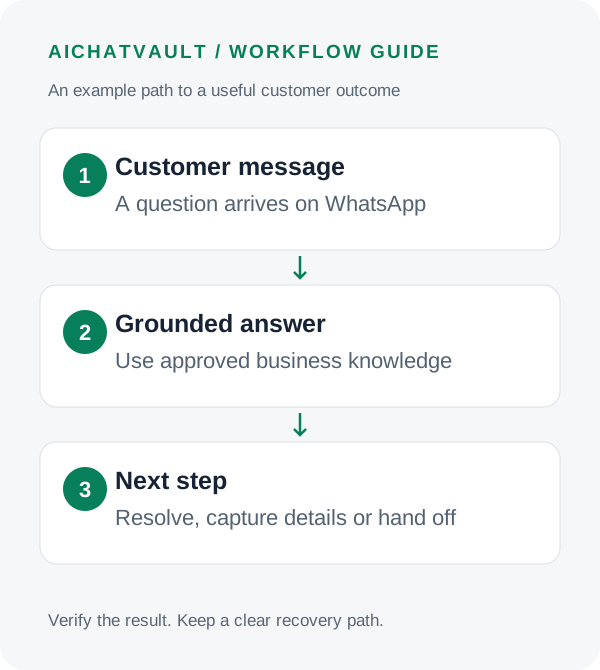
The first workflow to launch: answer a small set of common questions from approved content, then hand unresolved requests to a named support team. Add transactional actions after this basic experience works reliably.
Decide what the agent should handle
Start with questions whose answers already exist: opening hours, delivery areas, product features, onboarding steps and the published returns process. Give the agent a clear instruction to use your approved knowledge and say when information is missing.
Separate general information from account-specific information. Knowing your delivery policy does not give the agent access to an individual shipment. An order-status workflow needs a connected data source and an appropriate customer-verification process. Until that is configured, collect the reference and pass the request to your team.
Write down three boundaries: what the agent may explain, what it may do through configured integrations, and what requires a person. Requests involving a disputed payment, an exception to policy or an unhappy customer usually benefit from a clearly defined escalation path.
Prepare your WhatsApp connection
You need access to the relevant Meta business assets and a phone number that can connect through the WhatsApp Business Platform. Check the onboarding options for your existing number before making changes to it; migration and coexistence availability depend on the account and connection path.
- Open the agent in AIChatVault and choose Deploy → WhatsApp.
- Use the OAuth connection option and authorize the intended business account and phone number.
- Return to the connection screen and confirm the phone identifiers and connection status.
- Use Check Now to inspect connection health, then send a message from a separate test phone.
The manual connection path uses a Meta access token, phone number ID and WhatsApp Business Account ID. It also requires the displayed webhook URL and verification token to be configured in Meta with the messages subscription. Follow the WhatsApp setup instructions for that path. Never paste access tokens into agent knowledge or customer-facing messages.
Train for the questions customers actually ask
Use current help pages, concise policy documents and specific question-and-answer pairs. Check that sources agree about hours, charges and eligibility. An agent cannot reliably choose between two contradictory versions of a returns policy.
Test natural, short messages such as “open Sunday?”, “can I return this?” and “delivery to Zurich?”. Include misspellings and follow-up questions. A useful answer should address the question first and ask for only the missing information needed for the next step.
For a delivery-area question, the agent might ask for a postcode, look up the approved coverage information and explain the next step. It should not claim a parcel has shipped merely because a customer supplied an order number.
Make human handoff part of the experience
Configure the human handoff workflow and decide who will monitor it. Tell customers what happens next and use response-time language your team can actually meet.
In the WhatsApp inbox, review conversations needing attention and those with a human already active. Test that the AI stops replying during handoff so the customer does not receive overlapping answers.
Customer: “The replacement arrived damaged too. I want someone to help.”
Agent: “I’m sorry this happened again. I’ll pass this to our support team. What is your order reference?”
The desired result is an actionable handoff with the issue and reference preserved. A promise of a refund would require a separate, authorized process.
Keep follow-up messages within WhatsApp’s rules
A customer-service conversation and an outbound campaign are different workflows. WhatsApp allows free-form replies within the 24-hour customer-service window; outside that window, business-initiated messages require approved templates. Follow applicable opt-in requirements and provide a clear route to human support. Review the current WhatsApp Business Messaging Policy before enabling outbound automation.
AIChatVault’s template and campaign tools should be configured separately from the support inbox. A successful inbound reply does not prove an outbound template is approved or that its audience has opted in.
Run a small launch test
- Known answer: verify that a routine question receives the correct policy.
- Unknown answer: check that the agent acknowledges the gap and offers a useful next step.
- Human request: confirm that the conversation reaches the right team and AI replies pause.
- Connection issue: inspect the connection health and recent message log.
- Follow-up: test the appropriate messaging path rather than assuming every message can use free-form text.
After launch, review unanswered questions and a sample of completed conversations. Reply rate helps identify delivery or coverage problems, but it does not measure whether the customer’s issue was resolved. Track resolution quality and handoff follow-through alongside message activity.
Common questions
Can it answer questions about a specific order?
Only when an appropriate order-data workflow is connected and the customer can be verified. Training on an FAQ page alone does not provide live order access.
Can customers still speak to a person?
Yes. Configure human handoff, assign a monitoring team and test the transition before launch.
Should every message create a ticket?
Usually a narrower trigger is easier to manage. Start with unresolved issues or explicit support requests, then adjust based on the workload and quality of the resulting tickets.
Start with one dependable support flow. Explore the WhatsApp integration, connect your agent and test it against your most common customer questions.
Related reading: The customer support playbook.