
A customer should not have to repeat an entire conversation when a support issue becomes a ticket. Your team should receive the problem, the relevant details and a clear starting point.
AIChatVault’s Freshdesk integration connects conversation handling with the help desk. You choose when tickets are created, how they are routed and what context accompanies them. The quality of those choices matters more than creating tickets for every message.
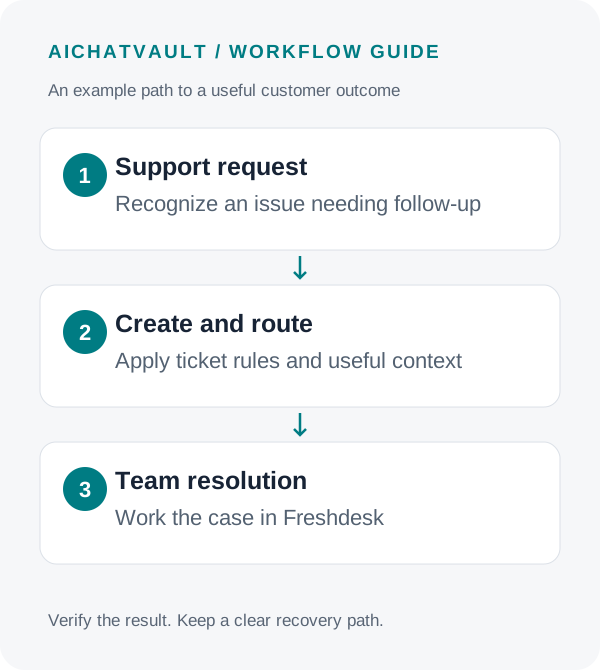
Choose a ticket trigger that matches your support process
Start with a narrow, understandable rule. For example, create a ticket when an issue needs human investigation or when the customer asks to escalate. Automatic creation for every captured lead may be appropriate for some teams, but it can also mix sales enquiries with genuine support work.
The integration supports configured triggers including captured leads, qualified leads, manual actions and escalation. Confirm what your selected trigger considers eligible using a test conversation. A label such as “qualified” should match your operational definition before it drives workload.
A useful ticket answers: Who needs help? What happened? What has already been tried? Which team should act next?
Connect Freshdesk and verify access
- In Freshdesk, open Profile Settings and obtain the API key for an account with the required permissions.
- In AIChatVault, open the agent and select Integrations → Freshdesk.
- Enter the Freshdesk subdomain and API key, then connect.
- Run Test Connection and check access for the features you intend to use.
Ticket access, contact access and knowledge access serve different purposes. Verify the relevant features instead of assuming that a working credential grants every capability. Keep the key in the integration configuration, never in a public document or agent response.
Set dependable defaults before conditional routing
Choose the default support group, priority, ticket type and tags. These settings provide a fallback when no conditional rule matches. Give the fallback queue an owner so unusual requests do not disappear into an unmonitored group.
Then add only the routing rules you can explain and test. Available conditions include conversation intent, sentiment, complaint detection, source URL and the chatbot involved. Matching rules can override the group, priority or tags.
For example, you might route an access problem to technical support and a delivery complaint to customer service. Treat these as proposed rules to configure, not automatic behavior that appears simply because Freshdesk is connected.
Do not make every negative phrase urgent. Test a mild complaint, a repeated failure and a genuinely time-sensitive issue. Your support policy should define which cases deserve a faster response.
Pass useful context into the ticket
Choose whether to create a Freshdesk contact and include the conversation transcript. Map supported lead information to the custom ticket fields your team uses. Required fields still need valid values.
A transcript is helpful when it prevents repeated questions, but it may also contain unnecessary personal information. Collect the minimum details for the task and check the information being transferred during your controlled test.
Customer: “I can sign in, but the export button fails. I tried another browser.”
Agent: “I can pass that to support. Which email should they use, and what error message do you see?”
The desired ticket contains the reported export problem, the attempted browser change and the supplied error. The agent should not invent a diagnosis. Freshdesk’s returned ticket identifier is evidence that a ticket was created; it is not evidence that the problem has been resolved.
Keep ticket creation and human takeover distinct
A new help-desk ticket and a live handoff are related but different events. Configure human handoff when your team should take over the conversation, and verify that AI replies pause appropriately.
Enable live ticket checking or escalation tools only where they fit your process. Test with tickets that belong to the controlled conversation, and check the information customers can see. Do not expose another person’s ticket merely because someone knows a ticket number.
Configure return updates separately
If ticket status or public replies should return to AIChatVault, configure the provided webhook in Freshdesk. Confirm the update reaches the intended conversation and test the relevant customer channel. Two-way delivery depends on that configuration and the supported channel behavior.
Knowledge-base synchronization is another separate feature. Choose approved content and an available sync schedule; use a public-articles restriction where appropriate. Canned-response import requires the necessary administrator permission. Connecting ticket creation alone does not automatically train the agent on all Freshdesk content.
Test the entire support journey
- Create a clearly marked test enquiry and verify exactly which trigger ran.
- Open the resulting Freshdesk ticket and check group, priority, tags, fields and transcript.
- Submit a case that matches no routing rule and inspect the fallback.
- Test human takeover and a configured public-reply or status update.
- Inspect integration activity when a field is missing or access fails.
- Close or remove test records according to your help-desk process.
After launch, review ticket completeness, misrouting, duplicate tickets and time to first human response. Ticket count by itself does not tell you whether customers are receiving better support.
Common questions
Will every chat become a Freshdesk ticket?
Only if your configured trigger calls for that. Choose a narrower rule when routine answers do not need a ticket.
Does disconnecting delete existing tickets?
Existing tickets remain in Freshdesk. Disconnecting stops new integration activity and removes synchronized knowledge sources from AIChatVault.
Can the agent use Freshdesk help articles?
Yes, through the separately configured knowledge sync. Select only content approved for the agent’s audience.
Explore the Freshdesk integration and use the setup guide to build a ticket flow your support team can trust.
Related reading: Setting up human handoff.