
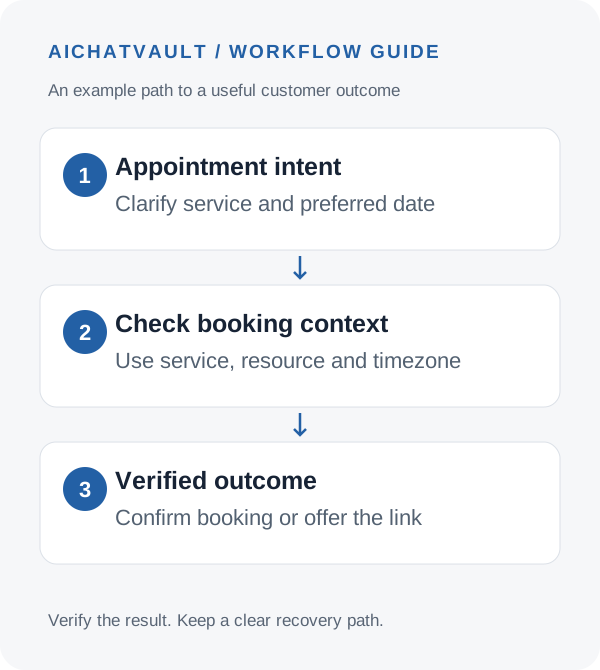
“Can I book a call next Tuesday?” sounds simple. Completing that request means identifying the right service, finding valid availability, using the correct timezone and confirming that an appointment was actually created.
AIChatVault connects to Zoho Bookings so an agent can guide customers through the configured appointment workflow. Depending on your settings, that can mean presenting a booking page or using the direct booking path. Both can be useful, but they represent different outcomes.
A booking link is an invitation to schedule. An appointment is confirmed only when the booking provider returns a successful result. Keep that distinction clear in customer messages and reporting.
Prepare the service before connecting the agent
In Zoho Bookings, make sure the intended workspace and service exist and are available for booking. Decide which staff member or resource the agent should use. Review the service’s duration, availability and customer-information requirements.
Start with one service, such as an introductory consultation. A focused first workflow is easier to verify than a mix of sales calls, onboarding sessions and specialist appointments with different requirements.
Choose a fallback booking URL that opens the intended service. A general homepage can leave the customer searching for the appointment they already requested.
Connect and configure Zoho Bookings
- Open your agent in AIChatVault and select Integrations → Zoho Bookings.
- Choose Connect with Zoho Bookings and approve the requested access.
- Select the workspace and service, then the supported staff member or resource.
- Set the booking timezone and provide the fallback booking URL.
- Enable direct booking only after the required resource is selected and you have confirmed that this is the workflow you want.
- Save and run Test Connection to check access to the configured booking context.
The Zoho Bookings setup guide covers this integration. It is separate from a simple Calendar action that shares a Calendly or Cal.com link.
Make date and timezone choices explicit
Customers may be in another country, using a VPN or writing while travelling. Do not treat their website address as a reliable statement of timezone.
Use an explicit date, time and timezone in the scheduling exchange. When someone says “tomorrow afternoon,” clarify what that means before creating an appointment. Daylight-saving transitions are another reason to avoid relying on an unlabelled time.
Customer: “Can I book an introductory call next Tuesday afternoon?”
Agent: “Which timezone should we use for the appointment?”
Customer: “Europe/Zurich.”
The next step is to use the configured service’s availability and supported booking flow. The agent should not invent available slots from the business’s general opening hours.
Use the appropriate completion path
With a link-based path, explain that the customer needs to choose and confirm a time on the booking page. Do not say “you are booked” just because the link was sent.
With direct booking enabled and the resource configured, the integration can use the supported booking flow and communicate the provider’s outcome. Verify that the appointment appears in Zoho Bookings with the correct service, customer details and time.
If direct completion is unavailable or fails, offer the configured booking page and explain what the customer should do next. A clear recovery path is more useful than repeated attempts accompanied by uncertain confirmations.
Booking interactions can differ between the website widget and messaging channels. Test the actual channel you intend to launch, including how booking cards or links appear, rather than assuming an identical interface everywhere.
Test changes to existing appointments
The integration includes supported appointment-management behavior such as checking, rescheduling and cancellation. These flows deserve their own tests because they act on an existing appointment.
Use a controlled booking and confirm that the relevant customer can access it through the intended interaction. For a reschedule, check the final appointment time in Zoho. For a cancellation, verify the final status. Do not infer either outcome from the wording of the chat alone.
Set expectations about business rules such as late cancellations or service changes in your approved content. When a request falls outside the supported flow, provide the booking page or a human contact rather than promising an exception.
Use this pre-launch checklist
- Service: the connected workspace and service are the intended ones.
- Resource: the expected staff member or resource is selected.
- Availability: a valid time can be offered, and an unavailable time does not produce a false confirmation.
- Timezone: customer-facing text agrees with the appointment in Zoho.
- Fallback: the booking link works on mobile and opens the correct destination.
- Changes: rescheduling and cancellation return a verifiable outcome for the test appointment.
- Cleanup: cancel remaining test appointments so they do not block real availability.
Measure completed appointments separately from booking links sent. Also review failed attempts, fallback usage and the quality of appointment details. These reveal friction that a simple count of scheduling conversations would miss.
Common questions
Is direct booking required?
No. A configured booking link can be a useful first launch. Direct booking needs the appropriate settings and resource selection.
Can we promise that every requested time is available?
No. Use the booking provider’s availability and final response. A customer’s requested time is a preference, not a reservation.
What happens if the direct flow cannot finish?
Guide the customer to the configured fallback booking page or your team, and avoid claiming an appointment exists without confirmation.
Explore the Zoho Bookings integration and launch one verified appointment journey before expanding to more services.
Related reading: Turning enquiries into useful leads.